Introduction
A Content Security Policy (CSP) is an HTTP response header telling the browser which scripts, styles, frames, fonts, and network connections a page is allowed to load or run. When an app accidentally renders attacker-controlled input, a strong Content Security Policy blocks injected <script> tags, inline event handlers, and unauthorized framing before they execute. As of November 25, 2026, OWASP and MDN treat CSP as a core browser defense against cross-site scripting (XSS) and clickjacking—when built as a strict policy rather than a broad domain allowlist.
Our HTTP security headers guide gives a brief overview across eight headers. This article focuses purely on Content Security Policy: directive fallback behavior, why host allowlists frequently fail security checks, strict nonce and hash CSP examples, configuring CSP in nginx and Apache safely, rolling out Content-Security-Policy-Report-Only, and testing policies before enforcing them.
Key Facts: Content Security Policy at a Glance
- What it mitigates: Reduces XSS impact (blocking injected inline and remote scripts), clickjacking (
frame-ancestors), form hijacking (form-action), and mixed content (upgrade-insecure-requests). - Defense in depth, not a patch: W3C CSP Level 3 and OWASP stress that CSP never replaces output encoding, input validation, or software patching.
- Recommended pattern: A strict nonce-based or hash-based CSP (
'nonce-{RANDOM}' 'strict-dynamic') rather than long host allowlists, which are often bypassable via JSONP or user-uploaded files on CDNs. - Safe rollout header: Always start with
Content-Security-Policy-Report-Onlyand a reporting endpoint (report-towithReporting-Endpoints, optionally paired withreport-uri). - Weaknesses to avoid:
'unsafe-inline','unsafe-eval', wildcard*, and broadhttps:schemes inscript-srcleave most XSS paths open. - Testing tools: Browser DevTools, Google CSP Evaluator,
curl -I, and the MDN HTTP Observatory.
How Content Security Policy Stops Attacks
Cross-site scripting occurs when untrusted data reaches the browser’s HTML or DOM parser and runs as JavaScript. Without a Content Security Policy, the browser treats your application bundle and an injected <script> tag or onerror="..." attribute identically—both access DOM content, localStorage, and authenticated APIs on that origin.
Sending Content-Security-Policy changes that trust model. The browser blocks inline scripts, eval()-style execution, unauthorized form targets, legacy embeds (object-src 'none'), and disallowed framing (frame-ancestors). Even if a template bug leaks unescaped input, the injected payload cannot easily execute.
CSP still has boundaries: it does not fix SQL injection or broken access control on the server, and it does not protect pure JSON API responses. As our OWASP Top 10 guide explains, input validation and output encoding come first; CSP is your second layer.
Core Content Security Policy Directives Explained
A Content Security Policy consists of semicolon-separated directives. Knowing how fallbacks work prevents policies that are silently permissive or unexpectedly break features.
| Directive | Category | Recommended Value | What It Controls |
|---|---|---|---|
default-src | Fetch | 'self' or 'none' | Fallback for any fetch directive not explicitly listed |
script-src | Fetch | 'nonce-{RANDOM}' 'strict-dynamic' | Valid sources for JavaScript and WebAssembly |
script-src-elem | Fetch | Inherits script-src | <script> elements specifically (CSP Level 3) |
script-src-attr | Fetch | 'none' (via script-src) | Inline event handlers like onclick= |
style-src | Fetch | 'self' (or nonce/hash) | Stylesheets and inline <style> blocks |
img-src | Fetch | 'self' | Images and favicons (add data: only if required) |
connect-src | Fetch | 'self' plus API origins | fetch(), XMLHttpRequest, WebSocket, EventSource |
font-src | Fetch | 'self' | Web fonts loaded via @font-face |
object-src | Fetch | 'none' | <object> and <embed> legacy plugins |
base-uri | Document | 'none' or 'self' | Allowed <base> URLs (blocks relative-URL hijacking) |
form-action | Navigation | 'self' | Target URLs for HTML <form> submissions |
frame-ancestors | Navigation | 'none' or 'self' | Which parent pages may embed your site in a frame |
upgrade-insecure-requests | Document | (no value) | Upgrades http:// subresource URLs to https:// |
report-to | Reporting | csp-endpoint | Names the endpoint group from Reporting-Endpoints |
Keep two W3C CSP Level 3 rules in mind:
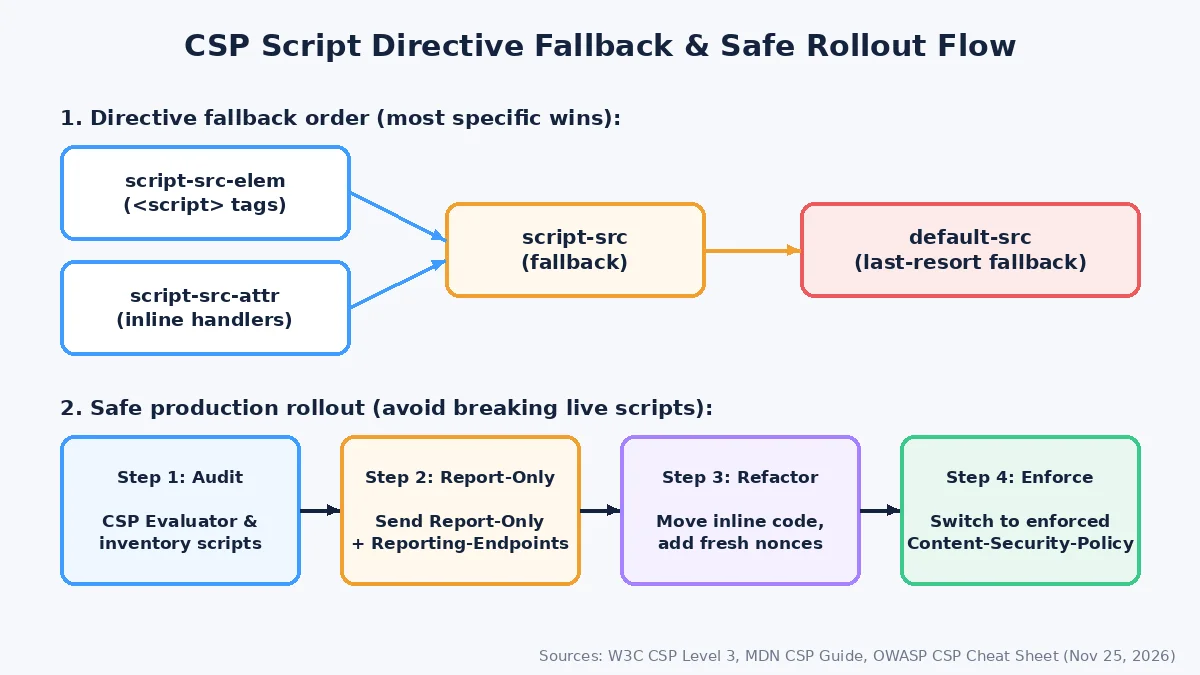
base-uri,form-action, andframe-ancestorsdo NOT fall back todefault-src. Settingdefault-src 'none'alone does not block clickjacking or form hijacking—declare them explicitly.- Specific fetch directives override broader ones. For
<script>elements, the browser checksscript-src-elem, thenscript-src, thendefault-src. For inline attributes, it checksscript-src-attr, thenscript-src, thendefault-src.
Strict CSP Examples vs. Allowlist Policies
Teams often start by listing trusted domains: script-src 'self' https://cdn.example.com. OWASP and Google’s CSP research warn that host allowlists are brittle and frequently bypassed if a whitelisted CDN hosts user uploads, old AngularJS builds, or JSONP endpoints.
Strict Nonce-Based CSP (Dynamic and SSR Apps)
If your server or SSR framework renders HTML per request, generate a fresh random Base64 nonce (at least 128 bits) on every response and attach it only to trusted <script> tags:
Content-Security-Policy: default-src 'self'; script-src 'nonce-rAnd0mPerReQue5tV4luE' 'strict-dynamic' https: 'unsafe-inline'; object-src 'none'; base-uri 'none'; frame-ancestors 'none'; form-action 'self'; upgrade-insecure-requests;Modern browsers that recognize nonces ignore 'unsafe-inline', and browsers supporting 'strict-dynamic' ignore https: in script-src, trusting scripts dynamically loaded by an already-nonced script instead. Never reuse nonces across responses, and never auto-stamp nonces onto all <script> tags in middleware (which would also bless injected attacker scripts).
Hash-Based Strict CSP (Static HTML Sites)
Static sites hosted on CDNs or object storage cannot mint per-request nonces. Instead, keep JavaScript in external 'self' files or authorize exact inline snippets by SHA-256 hash:
Content-Security-Policy: default-src 'none'; script-src 'self' 'sha256-47DEQpj8HBSa+/TImW+5JCeuQeRkm5NMpJWZG3hSuFU='; style-src 'self'; img-src 'self'; font-src 'self'; connect-src 'self'; object-src 'none'; base-uri 'none'; frame-ancestors 'none'; form-action 'self';Deliver CSP via HTTP headers rather than <meta http-equiv="Content-Security-Policy">, because <meta> delivery ignores frame-ancestors, reporting directives, and Report-Only mode.
Rolling Out Report-Only Without Breaking Production
Enforcing a new Content Security Policy immediately on an active site risks breaking analytics, payment widgets, or inline scripts. Deploy Content-Security-Policy-Report-Only first so browsers report violations without blocking execution.
Pair the modern Reporting-Endpoints header and report-to directive with report-uri if you also want legacy client coverage:
Reporting-Endpoints: csp-endpoint="https://example.com/csp-reports"
Content-Security-Policy-Report-Only: default-src 'self'; script-src 'nonce-rAnd0mPerReQue5tV4luE' 'strict-dynamic'; object-src 'none'; base-uri 'none'; frame-ancestors 'none'; report-uri /csp-reports-legacy; report-to csp-endpoint
Browsers send JSON POST reports (Content-Type: application/reports+json) showing blockedURL, effectiveDirective, documentURL, sourceFile, and lineNumber. Monitor Report-Only across login, checkout, and admin flows for one to two weeks before switching to Content-Security-Policy. Filter out noise from browser extensions (chrome-extension://, moz-extension://) when triaging logs.
Configuring Content Security Policy in Nginx and Apache
Set your CSP in one layer—either the application (for per-request nonces) or the web server (for static or hash-based sites). Sending two Content-Security-Policy headers forces browsers to enforce the intersection of both, causing unexpected blocks.
Nginx Content Security Policy Example
server {
    listen 443 ssl;
    server_name example.com;

    add_header Reporting-Endpoints 'csp-endpoint="https://example.com/csp-reports"' always;
    add_header Content-Security-Policy-Report-Only "default-src 'self'; script-src 'self'; style-src 'self'; img-src 'self' data:; object-src 'none'; base-uri 'none'; frame-ancestors 'none'; form-action 'self'; report-to csp-endpoint;" always;
}
Watch two nginx rules from ngx_http_headers_module:
- Include
always, or nginx omits headers on 4xx and 5xx error pages. - Mind
add_headerinheritance. If anylocationblock defines its ownadd_header(such asCache-Control), nginx drops allserver-leveladd_headerdirectives for that location unless repeated or merged withadd_header_inherit(available since nginx 1.29.3). Keep nginx patched via our nginx security update guide.
Apache HTTP Server Example
<IfModule mod_headers.c>
    Header always set Reporting-Endpoints "csp-endpoint=\"https://example.com/csp-reports\""
    Header always set Content-Security-Policy-Report-Only "default-src 'self'; script-src 'self'; style-src 'self'; img-src 'self' data:; object-src 'none'; base-uri 'none'; frame-ancestors 'none'; form-action 'self'; report-to csp-endpoint;"
</IfModule>
Apache’s always table applies headers to error pages and internal redirects too. Pair this with patches from our Apache HTTP Server update guide.
How to Test and Audit Your CSP
Verify every deployment with three checks:
- Check live headers with
curl:
curl -sI https://example.com/ | grep -iE "content-security-policy|reporting-endpoints"Test the homepage, login route, content pages, and a 404 path to catch missing always flags or nginx location overrides.
- Audit with Google CSP Evaluator: Paste your header into csp-evaluator.withgoogle.com to catch weak directives (
'unsafe-inline', missingobject-src 'none', missingbase-uri, or risky CDN domains). - Verify in DevTools and MDN HTTP Observatory: Walk key user flows with DevTools Console open, then scan the public domain with the MDN HTTP Observatory.
Recommendations for Teams Deploying CSP
- Refactor inline code early: Move inline
<script>blocks into external files or nonced tags, and replaceonclick="..."attributes withaddEventListener(). - Pair CSP with a WAF: A web application firewall blocks malicious requests at the edge while CSP constrains script execution in the browser.
- Treat CSP generators as a starting point: Automated CSP generator tools often insert broad
https:or'unsafe-inline'rules—always verify output in CSP Evaluator and test via Report-Only first. - Harden the underlying host: Keep your OS and services updated using our Ubuntu server security guide.
FAQ
What is a good starter Content Security Policy for a new site?
Begin in Content-Security-Policy-Report-Only with default-src 'none'; script-src 'self'; style-src 'self'; img-src 'self'; font-src 'self'; connect-src 'self'; object-src 'none'; base-uri 'none'; frame-ancestors 'none'; form-action 'self';, then add only the exact third-party origins or nonces your site requires.
Should I use CSP frame-ancestors or X-Frame-Options?
Use CSP frame-ancestors, which OWASP says obsoletes X-Frame-Options and supports multiple origins. Keeping X-Frame-Options: DENY alongside it for older clients is harmless.
Why does CSP Evaluator warn about my domain allowlist?
Public CDNs and cloud storage domains often host JSONP endpoints, user uploads, or legacy libraries that attackers can load to bypass a host-based allowlist. Nonces or hashes with 'strict-dynamic' avoid that weakness.
Can nginx generate CSP nonces safely on its own?
Avoid sub_filter nonce hacks inside nginx: stamping a nonce onto every <script> tag in HTML would also bless an attacker’s injected script. Generate per-request nonces inside your backend or SSR templates instead.
What is the difference between report-uri and report-to?
report-to is the CSP Level 3 directive referencing an endpoint group in Reporting-Endpoints. report-uri is deprecated in CSP Level 3, though MDN notes teams still pair both while older browsers transition.
Conclusion
A strict Content Security Policy sharply reduces XSS and clickjacking impact without slowing down your application. Audit inline scripts, deploy Content-Security-Policy-Report-Only with violation reporting first, avoid add_header inheritance traps in nginx, and verify every policy with curl and Google CSP Evaluator before enforcing it.
References
All references below were verified on November 25, 2026.
- MDN: Content Security Policy (CSP) Guide
- MDN: Content-Security-Policy Header Reference
- OWASP Content Security Policy Cheat Sheet
- W3C Content Security Policy Level 3 Specification
- Google CSP Evaluator
- MDN HTTP Observatory
- nginx documentation: ngx_http_headers_module
- Apache HTTP Server documentation: mod_headers
Related Articles
- HTTP Security Headers: What to Set, How to Configure Them and How to Test
- OWASP Top 10 Explained: A Practical Guide to Website Security
- Complete Guide to Web Application Firewall WAF
- Nginx Security Update: 1.30.7 and 1.31.9 Fix 10 CVEs
- Apache HTTP Server 2.4.71: Patch mod_http2 CVE-2026-119618
Last Verified: November 25, 2026. Prepared by SafeWebAcademy from W3C CSP Level 3, MDN, OWASP, nginx, and Apache documentation linked above. Browser support and recommendations change; re-test policies in Report-Only before production updates.