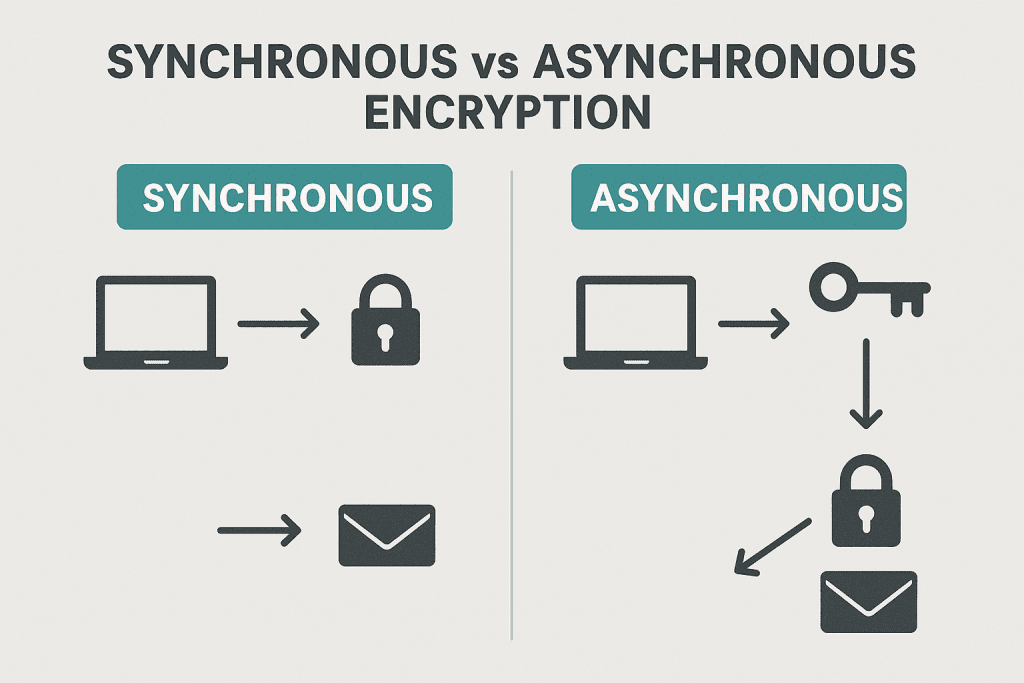
Encryption keeps our data safe. In simple terms, there are two big families: methods where both sides share the same secret, and methods where each side has different keys. People often call these synchronous and asynchronous encryption, but the more common names are symmetric and asymmetric encryption. This guide explains both in plain English, with short code examples and practical tips.
Synchronous vs Asynchronous Encryption Explained
When people say synchronous encryption in everyday security talk, they usually mean symmetric encryption: the sender and the receiver use the same secret key to lock and unlock data. Think of it like a safe with one combination that both of you know. This is the powerhouse used to protect most data in motion and at rest because it is fast and efficient.
Asynchronous encryption is the common term for asymmetric encryption: there are two different keys, a public key and a private key. The public key is like a lock you can share with the world, and the private key is the only key that opens it. Anyone can lock a message for you using your public key, but only you can open it with your private key.
Why does the naming cause confusion? In programming, synchronous vs asynchronous usually describes timing and waiting, not cryptography. But in security writing, some folks casually use synchronous to mean “same key on both sides” and asynchronous to mean “different keys on each side.” In this article, synchronous = symmetric (shared key) and asynchronous = asymmetric (public/private key).
Real-world use mixes both. Your Wi‑Fi with WPA2 or WPA3 mainly uses symmetric encryption (like AES) to keep traffic fast and secure. When you visit an HTTPS site, your browser first uses asymmetric crypto to safely agree on a shared secret, and then switches to symmetric crypto for the actual data transfer. This combo is called hybrid encryption and is the standard on the internet.
Speed is the big practical difference. Symmetric encryption is very fast and good for large files or streaming. Asymmetric encryption is slower and better for small things like exchanging keys, verifying identity, and digital signatures. That’s why protocols rarely encrypt entire videos with RSA; they use RSA or Elliptic Curve to set up a safe session, then use AES or ChaCha20 for the heavy lifting.
A good mental model: asymmetric is for trust and handshake, symmetric is for performance. Use asymmetric to agree on secrets without meeting in person, and symmetric to actually protect the bulk of your data once you share a key.
Public Key vs Shared Key: What These Terms Mean
A shared key (symmetric key) is a single secret that both sender and receiver know. If you both keep it safe, you can encrypt and decrypt messages quickly. The tough part is how to share that key securely in the first place. If someone steals it, they can read and forge messages.
A public key system (asymmetric) gives you a key pair. Your public key is safe to share; your private key must stay secret. If I encrypt with your public key, only your private key can decrypt. If I verify your digital signature, I use your public key to check that only your private key could have created it.
Key exchange is the art of creating a shared key without anyone else learning it. Modern connections often use Diffie-Hellman or Elliptic Curve Diffie-Hellman so both sides derive the same secret over an insecure network. Certificates and certificate authorities help you trust that the public key you see actually belongs to the website or service you intended, blocking simple man-in-the-middle attacks.
Digital signatures solve a different but related problem: authenticity and integrity. With signatures, you don’t hide the message; you prove who sent it and that it wasn’t changed. The sender signs with their private key; anyone can verify with their public key. That’s how software updates and package managers prove that files are legit.
Algorithms you will hear a lot: AES and ChaCha20 for symmetric encryption; RSA and Elliptic Curve (like Curve25519, P-256) for asymmetric crypto; SHA-256 and SHA-3 for hashing; GCM and Poly1305 for authenticated encryption. Key sizes matter too: AES-256 is very strong; for RSA, 2048-bit is the common minimum today, with 3072 or 4096 used in higher-assurance systems; for elliptic curve, 256-bit curves like P-256 or X25519 give strong security with small keys.
Common myths: asymmetric isn’t “better” than symmetric; it does different jobs. Another myth is that bigger keys always mean better security for everything—bigger RSA keys can be slower and increase message size, and not all algorithms scale the same way. Pick modern, vetted algorithms and follow best practices instead of chasing extreme sizes.
Plain Examples and Simple Code Snippets for Beginners
Let’s start with a simple symmetric example using AES-GCM in Python. AES-GCM is fast and provides authenticated encryption, meaning it both hides your data and detects tampering. This is great for most app use cases like tokens, small files, or API secrets.
# Python 3.x
# pip install cryptography
from cryptography.hazmat.primitives.ciphers.aead import AESGCM
import os

key = AESGCM.generate_key(bit_length=256)  # 32 bytes
aesgcm = AESGCM(key)
nonce = os.urandom(12)  # 12-byte nonce for GCM
plaintext = b"hello symmetric world"
ciphertext = aesgcm.encrypt(nonce, plaintext, associated_data=None)

# Decrypt
decrypted = AESGCM(key).decrypt(nonce, ciphertext, associated_data=None)
print(decrypted)  # b'hello symmetric world'
Here’s the same idea in Node.js using AES-256-GCM. Note how we keep the key and IV (nonce) safe and store the auth tag alongside the ciphertext. You must never reuse the same nonce with the same key in GCM.
// Node.js
const crypto = require('crypto');

const key = crypto.randomBytes(32);     // 256-bit key
const iv = crypto.randomBytes(12);      // 96-bit IV for GCM
const plaintext = Buffer.from('hello symmetric world');

const cipher = crypto.createCipheriv('aes-256-gcm', key, iv);
const encrypted = Buffer.concat([cipher.update(plaintext), cipher.final()]);
const tag = cipher.getAuthTag();

// Decrypt
const decipher = crypto.createDecipheriv('aes-256-gcm', key, iv);
decipher.setAuthTag(tag);
const decrypted = Buffer.concat([decipher.update(encrypted), decipher.final()]);
console.log(decrypted.toString()); // hello symmetric world
Now an asymmetric example in Python with RSA-OAEP. We generate a key pair, encrypt with the public key, and decrypt with the private key. In real apps, you’d store keys safely and avoid re-generating them every time.
# Python 3.x
# pip install cryptography
from cryptography.hazmat.primitives.asymmetric import rsa, padding
from cryptography.hazmat.primitives import hashes

private_key = rsa.generate_private_key(public_exponent=65537, key_size=2048)
public_key = private_key.public_key()

message = b"hello asymmetric world"
ciphertext = public_key.encrypt(
    message,
    padding.OAEP(mgf=padding.MGF1(algorithm=hashes.SHA256()),
                 algorithm=hashes.SHA256(),
                 label=None)
)

plaintext = private_key.decrypt(
    ciphertext,
    padding.OAEP(mgf=padding.MGF1(algorithm=hashes.SHA256()),
                 algorithm=hashes.SHA256(),
                 label=None)
)
print(plaintext)  # b'hello asymmetric world'
And the same idea in Node.js with RSA-OAEP. Again, asymmetric crypto is slower and better used for small messages like keys or short secrets.
// Node.js
const { generateKeyPairSync, publicEncrypt, privateDecrypt } = require('crypto');

const { publicKey, privateKey } = generateKeyPairSync('rsa', { modulusLength: 2048 });

const msg = Buffer.from('hello asymmetric world');
const enc = publicEncrypt({ key: publicKey, oaepHash: 'sha256' }, msg);
const dec = privateDecrypt({ key: privateKey, oaepHash: 'sha256' }, enc);

console.log(dec.toString()); // hello asymmetric world
Practical tips: never roll your own crypto; use high-level, audited libraries. Prefer authenticated encryption modes like AES-GCM or ChaCha20-Poly1305. For new systems, consider elliptic curves (X25519/XChaCha20) for speed and strong security. Always use a secure random number generator for keys and nonces. Rotate keys and store them with a proper key management system.
Choosing the Right Method: Speed, Size, Security
Speed: symmetric encryption wins by a mile. AES and ChaCha20 can encrypt gigabytes per second on modern hardware, sometimes with CPU instruction support. Asymmetric methods like RSA and ECDH are thousands to millions of times slower per byte, which is why we only use them for small payloads such as keys or identity operations.
Size: asymmetric ciphertexts and signatures are larger. For RSA-2048, the ciphertext size is roughly the key size (around 256 bytes) even for a tiny message. Symmetric ciphertexts add a small overhead (nonce + tag, often a few dozen bytes) no matter the message size. If you care about bandwidth or storage, symmetric is more compact for bulk data.
Security properties: asymmetric gives you identity tools like digital signatures and safe key exchange over the public internet. Symmetric gives you efficient confidentiality and integrity once you already share a secret. For modern protocols, add forward secrecy using ephemeral Diffie-Hellman (X25519 or P-256): if a server’s long-term key is later stolen, past traffic stays safe.
Typical pattern: hybrid encryption. Use asymmetric crypto to authenticate and agree on a fresh symmetric session key (the TLS handshake), then use symmetric crypto to protect the rest of the traffic. For files, encrypt the file with a random symmetric key, then encrypt that key with the recipient’s public key and attach it.
A simple decision guide: if you need to encrypt large data fast (files, streams, databases), choose symmetric (AES-GCM or ChaCha20-Poly1305) and manage keys well. If you need to send a secret to someone you don’t share a key with, or you need verifiable identity, use asymmetric to exchange or wrap the symmetric key. For offline backups you control, symmetric with a strong passphrase-based key derivation (Argon2, scrypt) is a good fit.
Quick Q&A:
Q: Is asymmetric always more secure? A: No, it solves different problems; both are strong when used correctly.
Q: Can I encrypt big files with RSA? A: Don’t. Use RSA/ECC to encrypt a random symmetric key, then use AES/ChaCha20 for the file.
Q: What’s best for mobile? A: ChaCha20-Poly1305 is fast on devices without AES hardware; AES-GCM is great where hardware support exists.
Q: What about passwords? A: Never encrypt passwords; hash them with a slow, salted KDF like Argon2, bcrypt, or scrypt.
In short, synchronous (symmetric) encryption is your fast workhorse for protecting data, and asynchronous (asymmetric) encryption is your smart doorman for identity, key exchange, and signatures. Most real systems use both in a hybrid design: public key methods to agree on secrets, shared key methods to move data at high speed. Use modern, vetted algorithms, authenticated modes, secure randomness, and proper key management to stay safe without overcomplicating your stack.